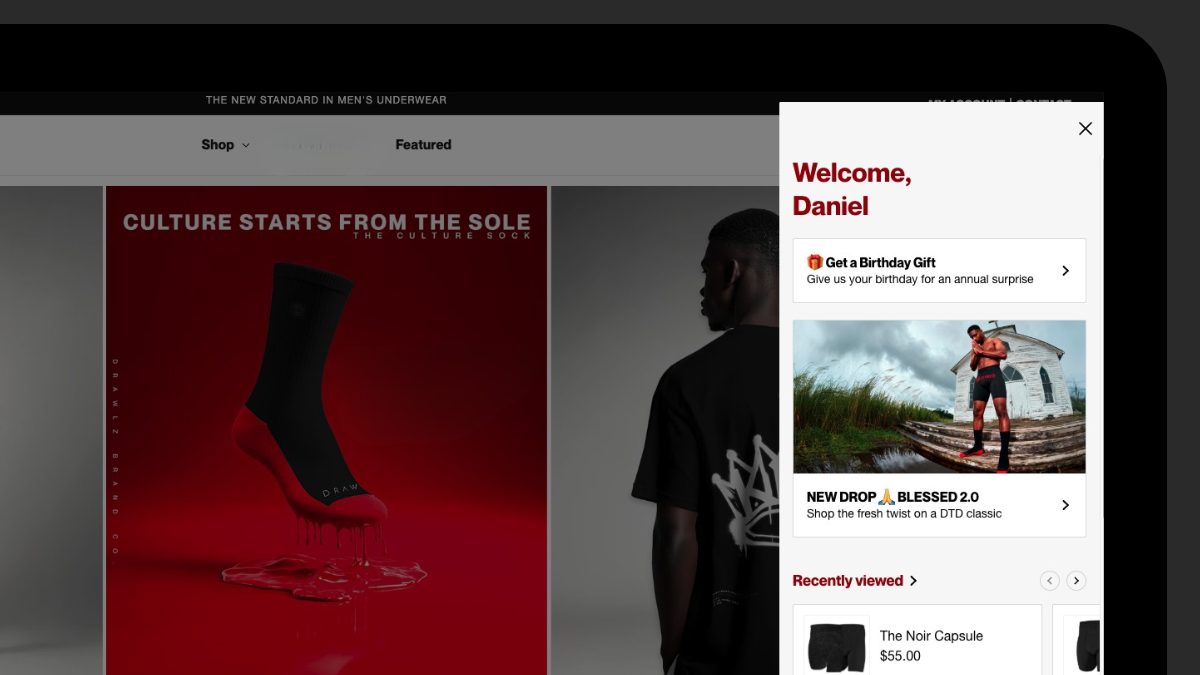
Conveniently Communicate Targeted Messages
The 2025 Klaviyo Boston Event was one for the books; I’ve never left an ecom event more impressed or motivated.
Klaviyo released a number of new features at this event that truly cemented them as the CRM platform tailored to ecom brands, with my favorite being the new Klaviyo Customer Hub.
All in one personalized, dedicated spot, customers can:
- View & track orders
- Chat with support (and Klaviyo AI)
- Leave reviews
- Browse FAQs
- Update their profile
- Shop recently viewed products
- Build a favorites wishlist
- Shop recommended items
And pretty much anything else you can think of thanks to custom blocks.
To top it off, each block can be shown or hidden based on what segment the customer falls into. The content blocks featured in the main image of this post aren’t what every user will see.
The possibilities are truly endless with the hub, I’ve gone a bit crazy-obsessive with what I can do with it since its release, so I wanted to share some custom block ideas I’ve cooked up in relation to a luxury underwear brand I’ve worked with for years.
Feel free to borrow these ideas to apply them to your own clothing brand, or reach out so I can get this setup for your brand within a matter of days.

Block #1: Dynamic Size Display
Show to:
- Logged in users
- Segment of users who have the ‘Size’ profile property
With all of the size options across apparel brands, one of the biggest friction points customers have is remembering their size.
To combat this, you can capture your customers’ size through a post-purchase tagging flow, or having the customers plug in their size via a Klaviyo form, and set it to always display at the very top of the hub.
This block only appears once the ‘Size’ profile property is added to a Klaviyo profile.
Block #2: Hub Welcome Message
Show to:
- Logged in users
- Segment of users who created a hub account in the last 21 days
I wrote a blog post explaining how to use the hub along with its benefits so customers can fully comprehend the value it brings. This block directs to that blog post.
Plus, offering an incentive to sign up, then gating the reward behind the hub as a content block, increases hub sign-ups.
This block disappears when the discount is used, or three weeks after signing up.
Block #3: Find Your Size
Show to:
- All users
Don’t show to:
- Segment of users who have the ‘Size’ profile property
Echoing the sentiment of block #1, this block directs users to a page that explains how they can match up their pants waist size to the underwear sizes, and then has a Klaviyo form that allows them to add their size to their account.
This block will disappear once the ‘Size’ profile property is added to the account, and Block #1 will appear with the size dynamically populated.
Block #4: Get a Birthday Gift
Show to:
- Logged in users
Don’t show to:
- Users with the ‘Birthday’ profile property
Gathering customers’ birthdays allows for the annual birthday flow to trigger, and when enough are gathered, gives you the data to see the age ranges of your customers.
This block will disappear once the ‘Birthday’ profile property is added to their account.
Block #5: Review Your Order
Show to:
- Logged in users
- Delivered shipment last 14 days
Don’t show to:
- Loox review posted last 20 days
Using the awesome new Loox Review Links feature, you can gather more customer reviews by plugging in the Loox Review Link in this block. When a customer plugs in their email after hitting this link, Loox will immediately send them a review request email to streamline the review submission process.
This block will appear to recent buyers, and disappear when a Loox review is posted, or 14 days after delivery passes without a review.
Block #6: Track Your Order
Show to:
- Logged in users
- Placed order last 14 days
Don’t show to:
- Delivered shipment last 14 days
Make order tracking easier than ever, and train customers to use the hub, by offering an order tracking block.
I recommend using a shipping app that allows customers to track their order somewhere on your site to keep customers in your ecommerce ecosystem to increase the potential of repeat purchases. Sending customers to external tracking sites is a massive lost opportunity.
This block appears to recent buyers who haven’t had their order delivered, and disappears once the order reaches their doorstep.
Block #7: Review Us On Google
Show to:
- Logged in users
- Submitted 5 star review at least once over all time
With LLM visibility becoming more and more important at breakneck speed, it’s crucial to have multiple touch points across the internet that LLMs can reference.
With that said, you want to protect your high ratings across the internet from unsatisfied customers. To do this, make sure this block is only set to show to customers who have posted a 5 star rating in the past. To be extra cautious, you can gate it behind multiple five star ratings.
This block will show to customers who posted a five-star Loox review.
Block #8: Referral Link
Show to:
- Logged in users
- Placed order at least once over all time
Referrals can provide a considerable boost to your store’s revenue when promoted correctly; but a huge friction point of this is having customers dig through their inbox to find the referral link.
They have to really, really love your products to do that, and then send it to their network.
The hub gives you the opportunity to greatly reduce referral friction by having the referral link page live in the hub.
This block will show to all logged in customers.
Honorable Mentions
Other blocks I have in this hub includes:
- Links that send to collections of products that are in stock for their size
- SMS signup
- Gift cards
- New product/collection launches
Open Your Hub ASAP
As a Klaviyo marketer for 7+ years, I’ve always wanted a customer account page that didn’t cost my clients an arm and a leg with dynamic blocks that show/hide based on conditions. This is a serious game-changer for early adapters as it allows important emails and texts to essentially live in one place.
Get your hub implemented yesterday, encourage signups before BFCM, and reap the rewards of making your customers’ experience as easy as possible.
Need help setting this up? Book a call with me through my Calendly and we’ll get you rockin’ in no time.
Thanks for stopping by!
To happiness, strength, and health,
Dan Jacobs
Founder, CEO | Samadhi Email Marketing